FLUTTER WORKFLOW IN VS CODE

From a new project.
To a shipped app.

Bring the repetitive parts of Flutter development into one workflow, from the first setup to the final release.

ONE TOOLCHAINFrom project to release
  1. 01CreateArchitecture · Capabilities
  2. 02AdaptSDK · FVM · ohos
  3. 03DevelopCode · Assets · Rules
  4. 04ReleaseBuild · Upload
RELEASE CENTER
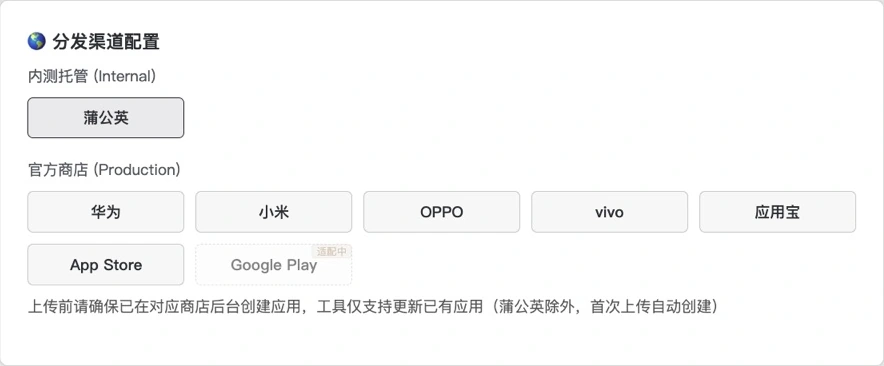
8channels
Actual Flu-CLI release center showing eight channels, with Google Play marked as in development
  • Pgyer
  • Huawei
  • Xiaomi
  • OPPO
  • vivo
  • MyApp
  • App Store
  • Google PlayIn development

Workflow overview · Actual release-center UIWorkflow and channel overview · Actual UI below

A product by HuoYe Studio

FLU-CLI WORKFLOW

Start faster.
Keep the workflow moving.

01 / 04

Start a new project.
Without starting from zero.

Choose the SDK, project structure, target platforms and common capabilities in one guided flow, or begin with a proven preset.

Every project keeps its own structure and technical choices.

02 / 04

Get HarmonyOS Flutter.
Ready for the project.

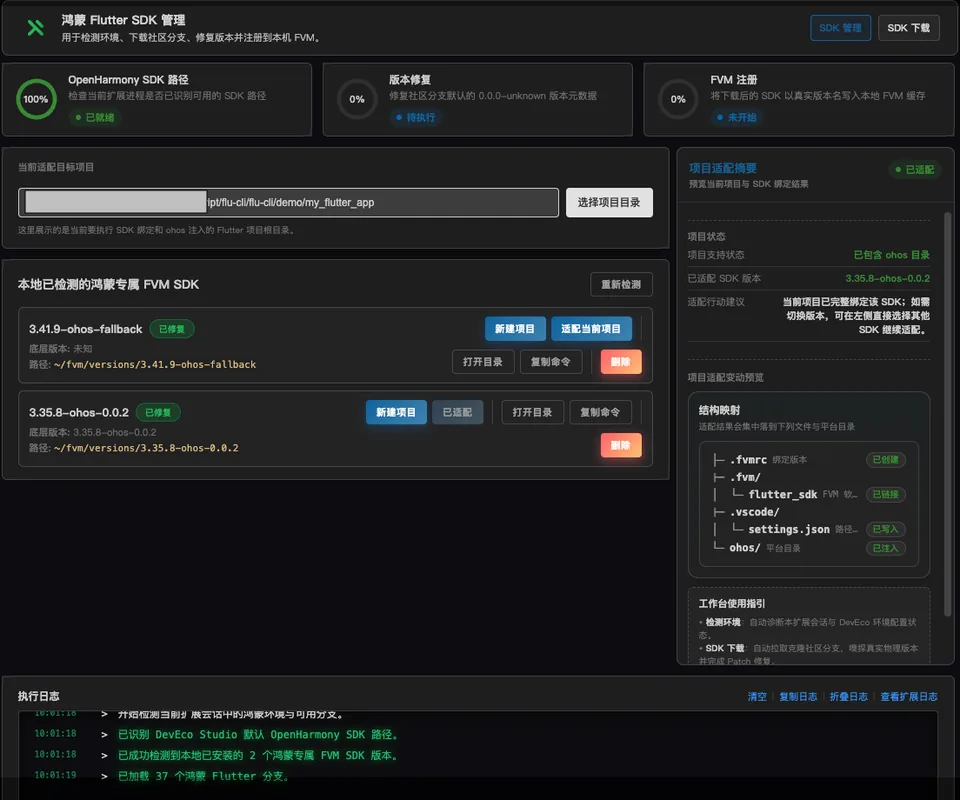
Check the local environment, manage HarmonyOS Flutter SDKs and help an existing project add HarmonyOS support.

SDK versions, project changes and execution results remain clear throughout the process.

03 / 04

Write less repetition.
Keep the project consistent.

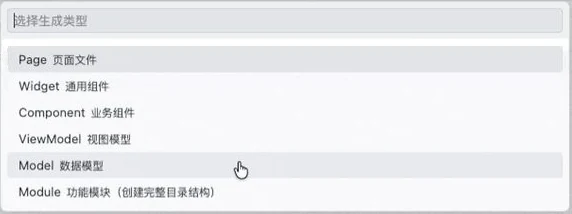
Generate common pages, components, data models and services directly in the project, following the structure already in use.

Assets, snippets and AI rules follow the same project conventions.

04 / 04

Build and upload.
In one connected flow.

Build only, upload an existing artifact or run the complete release flow, then see progress and results in one place.

Eight distribution entries are presented together in the current interface.

CREATE PROJECT VNEXTA seven-card visual wizard
  1. 01Identity
  2. 02Flutter SDK
  3. 03Architecture
  4. 04Capabilities
  5. 05Platforms
  6. 06Examples
  7. 07Assets
OFFICIAL PRESETSStandard Business App · Clean Enterprise

Capability structure · Not a product screenshot

HARMONYOS FLUTTERSDK management and project adaptation
Actual Flu-CLI HarmonyOS Flutter workspace with diagnostics, FVM SDKs, project adaptation and execution logs

Actual plugin UI · Sample local environment

CODE GENERATIONChoose the file type in place
Actual Flu-CLI code generator with Page, Widget, Component, ViewModel, Model and Module choices
PageViewModelWidgetComponentServiceModelModule

Actual plugin UI · File-type selector

BUILD & RELEASEChoose the flow, then choose the channels
Actual Flu-CLI modes: build only, full pipeline and upload onlyActual Flu-CLI distribution-channel interface

Actual plugin UI · Sample release configuration

DAY-TO-DAY DEVELOPMENT

Save time on the small things too.

01

Icons and splash screens

Create platform icons and configure splash logos, colors and backgrounds from one source image.

02

Project conventions

Turn the current project settings into AI rules that match its architecture and working style.

03

Templates and snippets

Reuse built-in, local or team templates, and keep common snippets close at hand.

BUILT FOR DEVELOPERS

Let the tool handle repetition.
Stay focused on the product.

This page combines labeled workflow illustrations with actual plugin screens from sample environments. Visit the official website for installation, configuration and detailed guides.